
The features of Vetium, your veterinary practice management software
From appointment to invoice.
Calendar, medical records, treatments and invoicing: everything your practice needs, in one place. With Petium, care continues at home too.
Follow the work. Don’t chase the information.
Three moments of the day, connected to each other.
1Calendar and bookings
Organise your appointments.
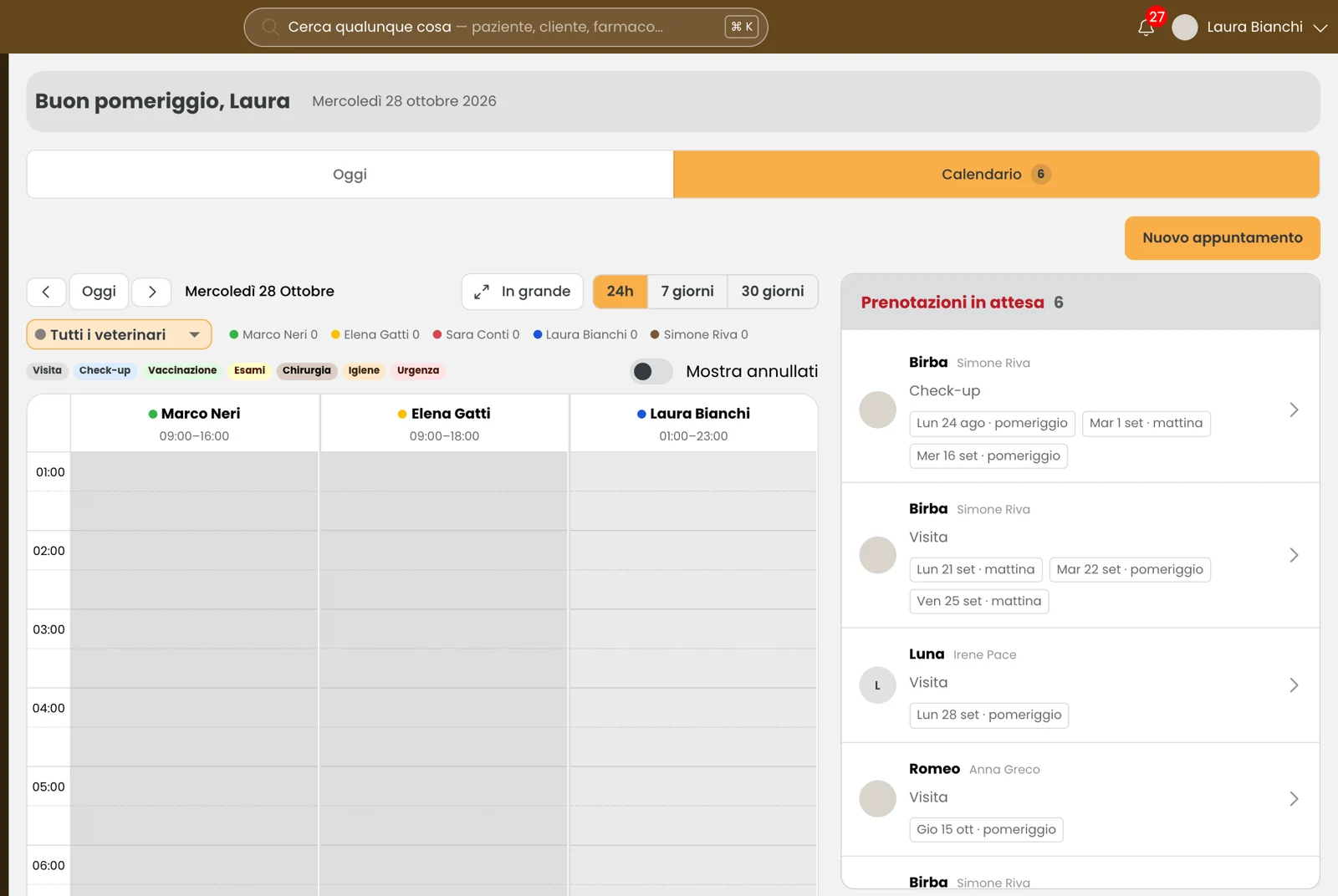
Appointments, availability and client requests in the same calendar. Each vet has their own column; you can view the day, the week or the month.
2Clients and medical records
Examine with the full history in front of you.
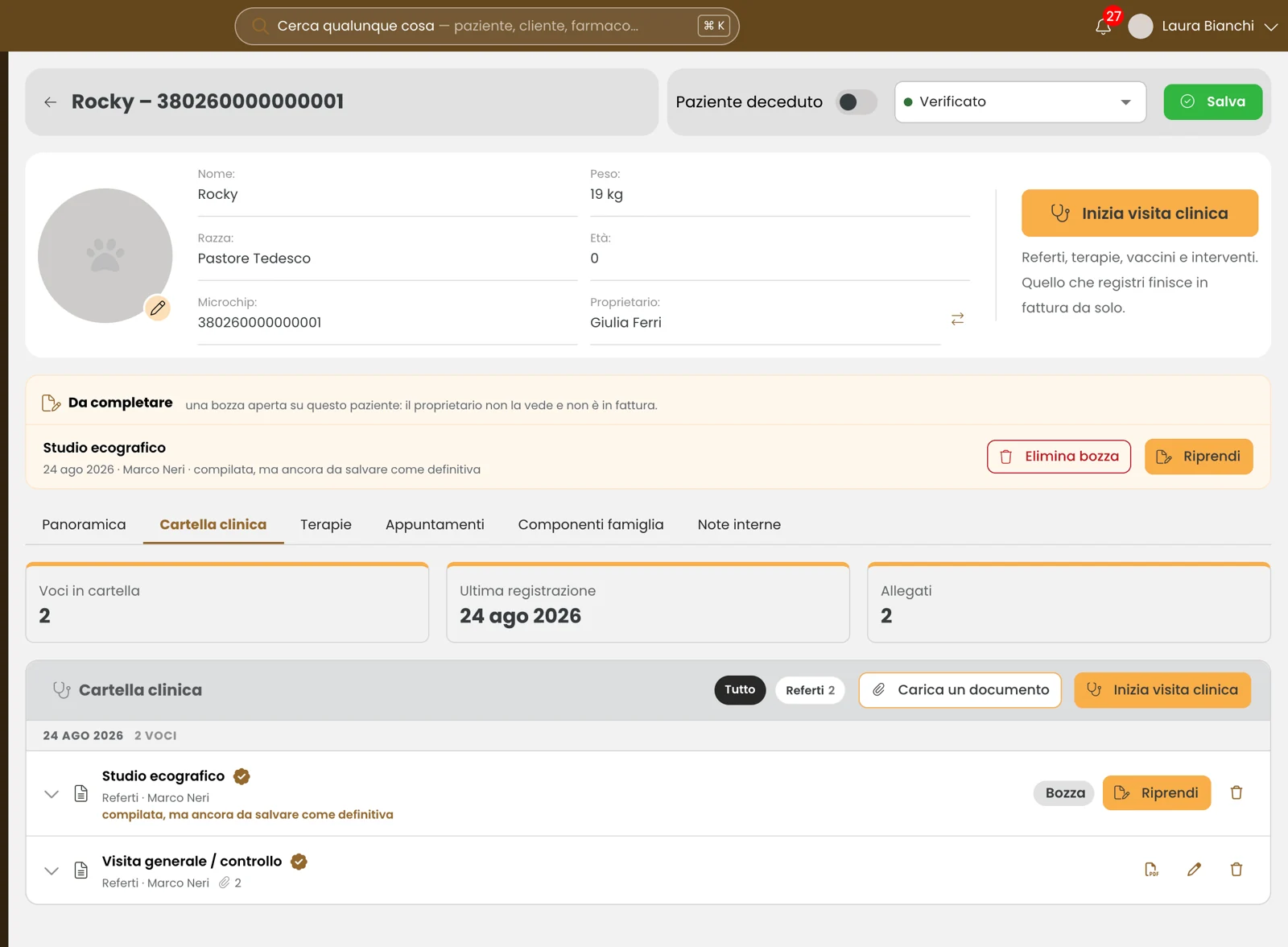
Owner details, visits, vaccines, procedures and attachments: find the patient’s information without starting from scratch every time.
3Estimates, invoices and payments
Turn the work done into the bill.
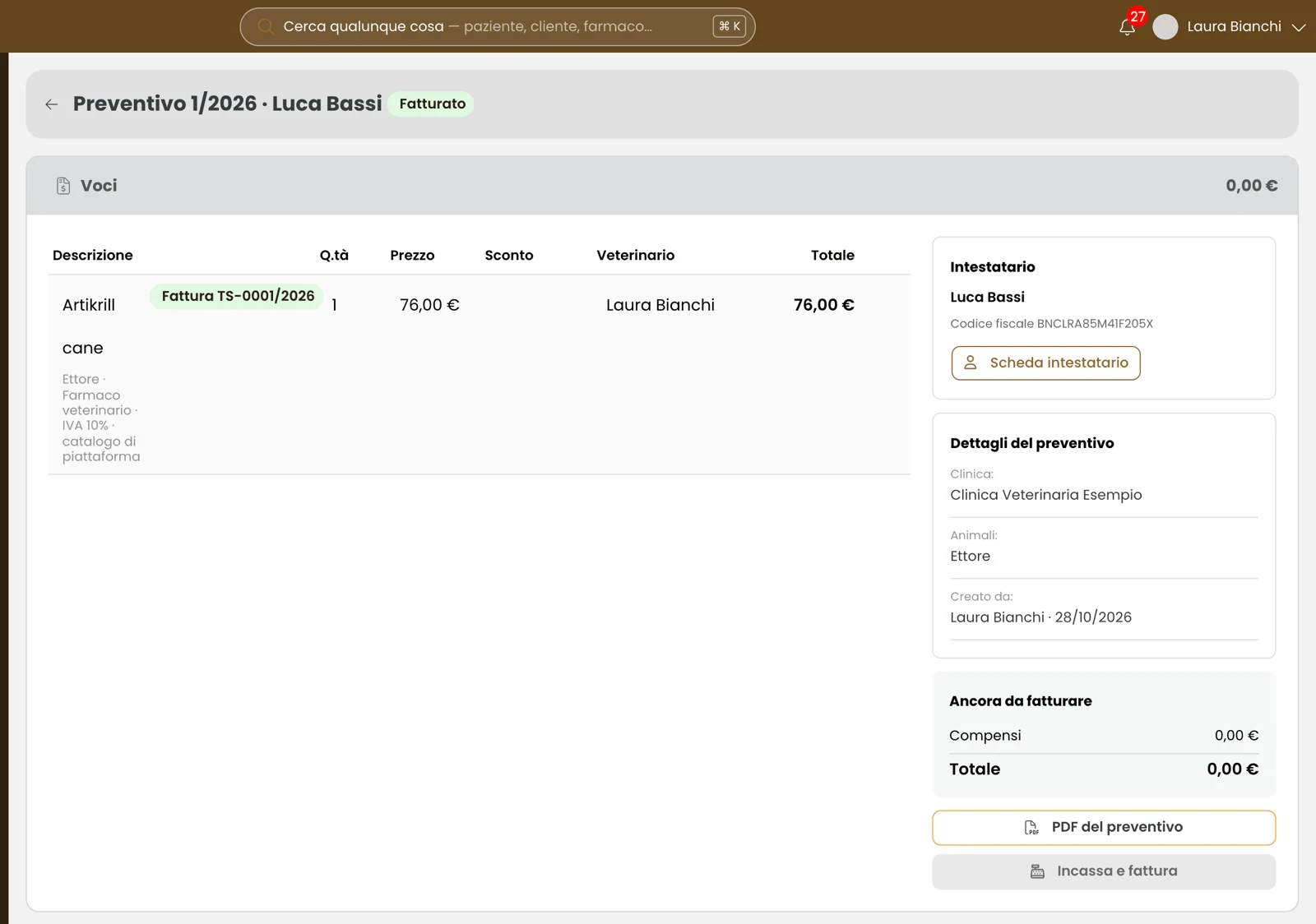
With “Save and add to invoice”, services and medications go straight into the client’s estimate. You check the items, record the payment and issue the invoice.
Inside Vetium, feature by feature.
31 features in six groups. Open a topic and see how it works in your practice.
Calendar and bookings
5 features
Search for the owner, choose the patient and the reason for the visit. Vetium suggests the duration and shows the free slots of the selected vet.
Requests from the app appear next to the calendar, with the reason and the proposed time slots. The practice chooses and confirms the appointment time.
Set your opening hours, including multiple shifts in a day. Tell a colleague’s holiday apart from a closure of the whole clinic.
Set shifts, breaks and holidays for an individual vet, or close the whole clinic. The proposed availability always respects the hours you have set.
Find patients, owners and medications from the top bar. You can also search by phone number, microchip or tax code.
Clients and medical records
6 features
Search by name, phone number, microchip or tax code. Records link owners and patients, appointments and documents; internal notes stay within the clinic.
Browse entries in chronological order, filter them by type and download reports as PDF. Add external documents and link them to a visit.
Save a visit as a draft and complete it later. The draft stays internal; saving it as final makes the entry visible to the owner in the app.
Record vaccines during the visit and see the next vaccination on the patient’s record. The dashboard highlights those due in the next 60 days.
Add PDFs, images and other documents to the record, including multiple files, up to 60 MB each. You can link them to a previous visit.
Create or duplicate report templates, edit fields and text, and attach a price. Custom templates remain available to your clinic.
Treatments and Petium
5 features
On the patient’s record you find ongoing treatments, the current day of treatment and the feedback sent by the owner through the app.
Select the medications you use and add your clinic’s own, with active ingredient, route of administration, standard dosage and whether a prescription is required.
Family members linked to the patient can view the record, treatments and appointments in the app. The practice’s internal notes stay separate.
Distinguish a medication administered in the clinic from a treatment prescribed for home: it changes what is recorded and what the owner needs to follow.
Draft visits stay internal. Saved reports and home treatments become viewable in the app; internal notes stay with the practice.
Estimates, invoices and payments
5 features
Create estimates even without a visit, add items from your price list and invoice in several stages: the remaining balance stays visible.
Tell paid invoices apart from those still to be collected. The payment schedule shows receivables, due dates and amounts; outstanding balances are on the client’s record.
Select the period and download the Excel summary and the XML files of your e-invoices. Once email is set up, you can send them to your accountant from Vetium.
One estimate can generate several invoices. Vetium shows how much is left to invoice and which invoices have already been issued.
Manage service prices, VAT rates and VAT-inclusive or VAT-exclusive pricing. Invoicing options include the ENPAV contribution and automatic stamp duty, depending on your practice’s settings.
SdI and Sistema Tessera Sanitaria
5 features
Once connected to the services, you can submit manually or enable automatic evening submissions in the dedicated settings.
View pending, accepted or rejected documents. For the Sistema TS, the protocol number and outcome are kept in the document’s history.
Set billing details, numbering and calculation methods. For the Sistema TS, link the credentials of the vet responsible for submissions.
Submissions require a connection to the services. For the Sistema TS, each vet sets up their own credentials and the clinic chooses who reports the expenses.
See paid invoices that have not yet been accepted by the Sistema TS, so you can spot the documents that need fixing.
Dashboard and organisation
5 features
Track visits this month, new clients, active patients and calendar occupancy. Spot vaccines that are due and treatments without a scheduled follow-up.
See revenue, payments received, receivables and average ticket. Find out which activities bring in revenue and how your clients pay.
Appointments, delays, draft visits and records to check: from the Home page you open the tasks that need attention.
Start from the key figures and switch to advanced mode when you want to dig deeper. Compare visits, calendar occupancy and payment trends.
From the Home page you find draft visits, delays and records to check. Each task links straight back to the work.
It adapts to the way you work.
The people, templates and data that make up your clinic.
Customisable clinical forms
Create, duplicate and edit your clinic’s templates, choose the fields and attach the price of the service.
Team members and roles
Invite colleagues by email and assign their role. The available actions depend on their permissions.
Data export
Download clients, patients, staff and appointments in Excel. For clinical records and a full backup, contact support.
Switching from another software
The import is handled by our team: we assess the available data and the transfer of client records.
Support close to your practice
Phone, WhatsApp, email and tickets with attachments, Monday to Friday, 9:00–12:00 and 14:00–18:00.
Want to see Vetium in your practice?
We’ll show you how it works and answer your questions. Leave your contact details and our team will get back to you to arrange a demo.